
Calculate your exact age in years, months, weeks, and days with the CalcGami.com, Age Calculator. Perfect for determining eligibility, tracking milestones, and planning for retirement.
Your Exact Age
0
Years
0
Months
0
Days
Fun Facts
- Born on a: -
- Zodiac Sign: -
Next Birthday
-
In Total
Table of Contents
What is an Age Calculator?
An Age Calculator is a precise time-tracking tool designed to determine the exact time elapsed between a specific start date (usually a Date of Birth) and an end date (usually today).While asking someone “How old are you?” typically results in a simple answer like “25 years old,” the reality is often more complex. Age can be measured in total months, total weeks, or even total hours. Furthermore, calculating an exact age manually is difficult due to the irregularities of the Gregorian calendar, such as months having different numbers of days (30 vs. 31) and the occurrence of leap years every four years. This Age calculator handles those complexities instantly to provide a detailed breakdown of your age.
Benefits of Using an Age Calculator
Beyond simple curiosity, an accurate Age Calculator serves several practical purposes:
- Application Precision: Many official forms (visas, government IDs, insurance) require your age in exact years and months. This tool prevents rejection due to calculation errors.
- Retirement Planning: Financial planning often relies on knowing exactly how many months remain until a specific retirement age (e.g., 60 or 65).
- Milestone Tracking: Parents can track the exact age of their infants in weeks or months for vaccination schedules and developmental milestones.
- Legal Eligibility: Helps determine if a person meets the specific age requirements for voting, driving, marriage, or senior citizen benefits on a specific date.
- Historical Research: Useful for calculating the age of historical figures or the duration of past events by comparing two specific dates in history.
Formula Used in Age Calculator
The calculation of age is logic-based rather than a single algebraic formula. It functions by subtracting the birth date from the current date, while “borrowing” months or days when necessary.
The Logic Flow:
- Calculate Years: Subtract the Birth Year from the Current Year.
- Calculate Months: Subtract the Birth Month from the Current Month.
- Condition: If the Current Month is less than the Birth Month, subtract 1 from the “Year” count and add 12 to the “Month” count.
- Calculate Days: Subtract the Birth Day from the Current Day.
- Condition: If the Current Day is less than the Birth Day, subtract 1 from the “Month” count. Then, find out how many days were in the previous month and add that number to the “Day” count.
Handling Leap Years:
The calculator automatically detects if a year is a leap year (divisible by 4, unless divisible by 100 but not 400) and assigns 29 days to February instead of 28.
How to Use the Age Calculator
Follow these simple steps to find your exact age:
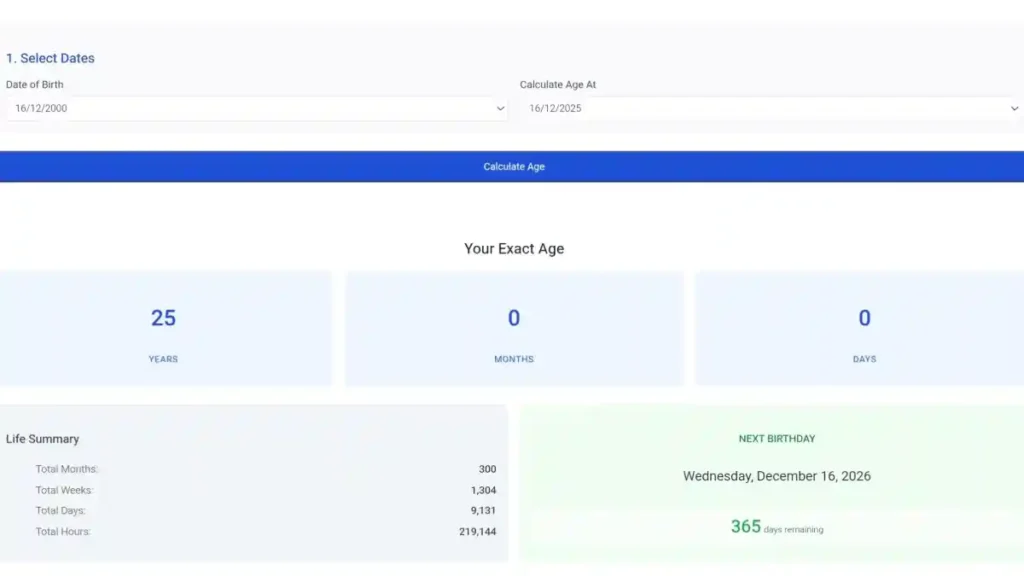
- Select Date of Birth: Enter the Day, Month, and Year you were born.
- Select Date of Age: By default, this is set to “Today.” However, you can change this to a future date (to see how old you will be then) or a past date.
- Calculate: Click the button to process the dates.
- View Results: The tool will display your age in multiple formats:
- Standard (Years, Months, Days).
- Total Months.
- Total Weeks.
- Total Days.
Real-Life Example
Scenario: You were born on October 25, 1995, and you want to know your exact age on May 10, 2025.
Step 1: Compare Years
Step 2: Compare Months
Current Month (May/05) is less than Birth Month (Oct/10).
- Action: Borrow 1 year from the Year count.
- New Year Count: 29 Years.
- New Month Calculation: 12+5(May)−10(Oct)=7 Months12+5(May)−10(Oct)=7 Months.
Step 3: Compare Days
Current Day (10) is less than Birth Day (25).
- Action: Borrow 1 month from the Month count (New Month Count: 6 Months).
- Borrow Days: The previous month was April (30 days). Add 30 to the Current Day.
- New Day Calculation: (10+30)−25=15 Days(10+30)−25=15 Days.
Final Result:
On May 10, 2025, you will be 29 Years, 6 Months, and 15 Days old.
Frequently Asked Questions (FAQ)
Does this calculator account for Leap Years?
Yes. The calculator includes logic to identify leap years (years with 366 days). If your age span includes a February 29th, it is counted as an extra day in the “Total Days” output to ensure 100% accuracy.
Can I calculate my age for a future date?
Yes. Simply change the “Age at Date of” field to any date in the future. This is helpful if you want to know exactly how old you will be on a specific upcoming event, like a wedding or retirement date.
Why is my result different from a manual calculation?
Manual calculations often assume every month has 30 or 31 days arbitrarily. Our calculator uses the specific number of days for the specific months involved (e.g., February is 28 or 29, September is 30, October is 31), providing a more precise result.
How is “Total Weeks” calculated?
Total weeks are calculated by taking the “Total Days” your have been alive and dividing by 7. Any remaining days are listed separately (e.g., “1,500 weeks and 3 days”).
Does the calculator include the end date in the count?
In standard age calculations, the end date (today) is generally considered the completion point. For example, if you were born on the 1st and today is the 2nd, you are 1 day old. The calculator measures the time elapsed since birth.
Can I use this to calculate the age of a building or pet?
Absolutely. The math is identical regardless of the subject. You can enter the “Date of Construction” or “Date of Adoption” as the birth date to find out exactly how long a building has stood or how long you have had your pet.