
Accurately estimate materials for Reinforced Cement Concrete projects with the CalcGami RCC Calculator. Calculate cement, sand, aggregate, and steel quantities for slabs, columns, and beams. Save your designs and share material lists via WhatsApp.
Material Requirements
Cement Bags Needed
0
Bags (50kg)Sand Volume
0
Cubic Meters
Aggregate Volume
0
Cubic Meters
Saved Calculations
| Date | Volume | Grade | Cement |
|---|
Related Calculators
Table of Contents
What is an RCC Calculator?
An RCC Calculator (Reinforced Cement Concrete Calculator) is a comprehensive civil engineering tool designed to estimate the materials required for structural concrete components. Unlike simple volume calculators, an RCC calculator breaks down the “wet volume” of a structure into its constituent parts: Cement, Sand, Aggregate (gravel), and Steel (reinforcement).
Whether you are pouring a roof slab, casting a structural column, or building a load-bearing beam, the ratio of materials determines the strength (e.g., M20, M25). This RCC Calculator applies the standard dry-volume conversion factors and steel percentage rules to give you a complete bill of materials. With features like History to track different structural elements, Save Calculation to build a whole house estimate, and WhatsApp Share to send the list to your supplier, it is an essential tool for site engineers and contractors.
Benefits of Using an RCC Calculator
Structural integrity relies on precise mix ratios. Using this tool ensures quality and budget control:
- Material Breakdown: It doesn’t just give volume; it tells you exactly how many bags of cement, cubic feet of sand, and kilograms of steel you need.
- Steel Estimation: It applies standard engineering percentages (e.g., 1% steel for slabs) to give you a preliminary rebar weight estimate without needing a detailed bar bending schedule.
- Dry Volume Logic: It automatically increases the wet volume by 54% to account for material shrinkage, a critical step often missed by DIYers.
- Project Compilation: Use Save Calculation to store “Column C1,” “Beam B2,” and “Slab S1” separately, helping you organize a massive project.
- Instant Procurement: Use WhatsApp Share to send the exact material requirements to your purchasing manager or hardware store instantly.
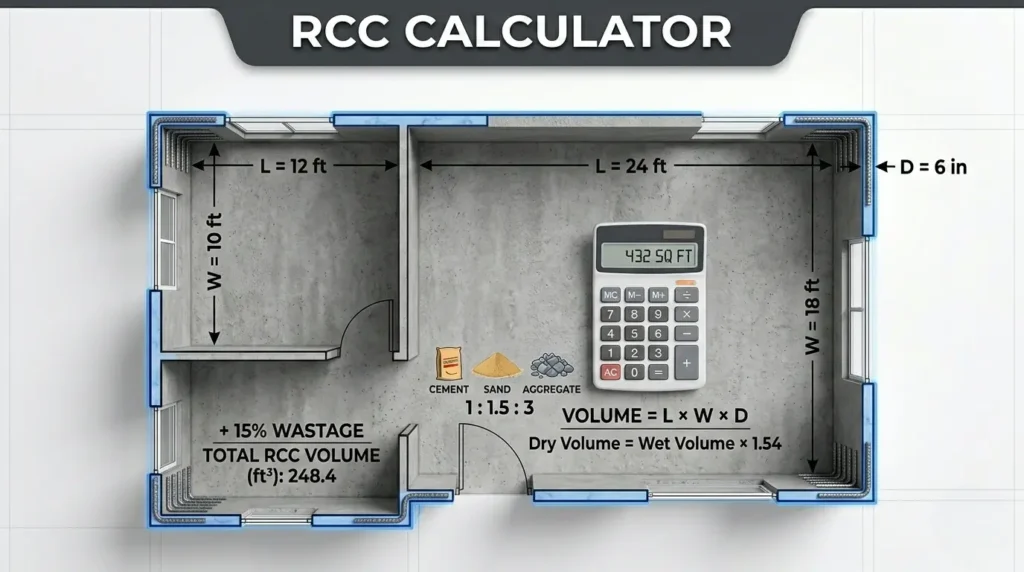
Formula Used in RCC Calculator
The RCC Calculator uses standard mix design ratios and dry volume coefficients.
The Plain Text Formulas:
Step 1: Calculate Wet Volume
Volume = Length x Width x Depth (or Height)
Step 2: Convert to Dry Volume
Dry Volume = Wet Volume x 1.54
(Dry materials shrink by 54% when water is added).
Step 3: Apply Mix Ratio (e.g., M20 = 1:1.5:3)
- Total Parts = 1 + 1.5 + 3 = 5.5.
- Cement: (1 / 5.5) x Dry Volume.
- Sand: (1.5 / 5.5) x Dry Volume.
- Aggregate: (3 / 5.5) x Dry Volume.
Step 4: Estimate Steel (Rebar)
- Slab: 1.0% of Concrete Volume.
- Beam: 2.0% of Concrete Volume.
- Column: 2.5% of Concrete Volume.
- Weight: Volume x 7850 kg/m ³.
How to Use the RCC Calculator
Follow these steps to generate a full material schedule:
- Select Structure: Choose Slab, Beam, or Column.
- Enter Dimensions: Input Length, Width, and Depth.
- Select Mix Grade: Choose M15, M20, or M25.
- Calculate: Click the button to process the mix design.
- Review Results: View the quantities for Cement (bags), Sand (cu ft), Aggregate (cu ft), and Steel (kg).
- Use Productivity Features:
- History: Review the beam calculation you did 5 minutes ago.
- Save Calculation: Store this as “First Floor Roof Slab.”
- Share on WhatsApp: Send the full list (Cement, Sand, Stone, Steel) to your vendor.
Real-Life Example
Scenario:
“Engineer Raj” is casting a roof slab. The slab is 10 meters long, 5 meters wide, and 0.15 meters thick. He is using M20 grade concrete (Ratio 1:1.5:3).
The Calculation:
Step 1: Wet Volume
10 x 5 x 0.15 = 7.5 Cubic Meters.
Step 2: Dry Volume
7.5 x 1.54 = 11.55 Cubic Meters.
Step 3: Cement Calculation (Ratio 1/5.5)
(1 / 5.5) x 11.55 = 2.1 m³.
Convert to Bags (0.035 m³ per bag): 2.1 / 0.035 = 60 Bags.
Step 4: Steel Estimation (1% for Slabs)
Volume of Steel = 1% of 7.5 m³ = 0.075 m³.
Weight = 0.075 x 7850 kg/m ³ = 588.75 kg.
The Result:
Raj needs 60 Bags of Cement and approx 589 kg of Steel.
- Action: Raj saves this as “Roof Slab A” and uses WhatsApp Share to send the order to the site supervisor.
Frequently Asked Questions (FAQ)
What is M20 or M25?
“M” stands for Mix. The number stands for the compressive strength in MegaPascals (MPa) after 28 days.
M15 (1:2:4): General flooring.
M20 (1:1.5:3): Standard for residential slabs/beams.
M25 (1:1:2): Heavy-duty columns/foundations.
Why is Steel estimated by percentage?
For a quick estimate, engineering codes suggest standard ranges (e.g., columns contain more steel than slabs). This percentage method is accurate enough for budget/procurement. For cutting and bending, you need a detailed structural drawing.
Does the calculator convert cubic meters to cubic feet?
Yes. Most calculators display both. Sand and Aggregate are often sold by “Cubic Feet” (Brass/Unit), while concrete is measured in Cubic Meters. 1 Cubic Meter = 35.31 Cubic Feet.
Can I save different mix ratios?
Yes. The Save Calculation feature stores all your inputs, including the specific mix ratio you selected. You can save one calculation for an M20 slab and another for an M15 floor base.
How accurate is the 1.54 factor?
It is the industry standard constant. It accounts for about 50-54% volume reduction due to void filling and compression. It is universally accepted for material estimation.
Is the WhatsApp link permanent?
The WhatsApp Share sends a text message snapshot of your current calculation. It does not create a live link. If you change the calculation, you must share a new message.