
Effortlessly calculate the exact time difference between two specific times. The CalcGami Time Duration Calculator is perfect for determining work hours, calculating payroll, tracking sleep cycles, and planning schedules with precision.
Total Duration
In Decimal Hours
0.00 hours
Total Minutes
0 minutes
Table of Contents
What is a Time Duration Calculator?
A Time Duration Calculator is a digital chronological tool designed to measure the exact interval between a “Start Time” and an “End Time.” While basic subtraction works for standard numbers (e.g., 10 minus 5), time calculations are notoriously difficult because they do not follow the standard decimal system (Base 10). Instead, time follows the Sexagesimal system (Base 60), where 60 seconds make a minute and 60 minutes make an hour.
This Time Duration calculator handles the complexities of Base 60 mathematics automatically. It accounts for the difference between AM and PM, handles “crossing midnight” scenarios (where a shift starts on one day and ends on the next), and converts the final result into various useful formats, such as total hours, total minutes, or decimal hours, making it an indispensable tool for payroll management, flight scheduling, and personal time tracking.
Benefits of Using a Time Duration Calculator
Calculating time intervals manually is prone to “off-by-one” errors and confusion over AM/PM conversions. Using this specialized tool offers several distinct advantages:
- Payroll Accuracy: For freelancers and employees paid hourly, knowing the exact duration of a work shift is critical. This tool converts “9:15 AM to 5:45 PM” into billable hours instantly.
- Decimal Conversion: Payroll software often requires time in decimals (e.g., 7.5 hours) rather than minutes (e.g., 7 hours 30 minutes). This calculator provides both formats to ensure your invoices are correct.
- Crossing Midnight: Calculating a night shift that starts at 10:00 PM and ends at 6:00 AM is confusing mentally. The calculator seamlessly handles the date change logic to give the correct 8-hour duration.
- Productivity Tracking: By measuring exactly how long specific tasks take, you can improve your time management and identify where you are losing productivity during the day.
- Sleep Cycle Monitoring: You can input the time you went to bed and the time you woke up to see exactly how much rest you achieved, helping you adjust for better health.
Formula Used in Time Duration Calculator
The Time Duration calculator uses a logic-based conversion process rather than a single algebraic equation. It converts all inputs into the smallest unit (minutes) to perform the subtraction.
The Logic Flow:
- Convert to 24-Hour Format:
First, the calculator converts 12-hour AM/PM inputs into a 24-hour clock.- Example: 2:00 PM becomes 14:00.
- Convert to Total Minutes:
Convert the Start and End times into “Total Minutes from Midnight.”- Formula: Total Minutes = (Hours x 60) + Minutes
- Perform Subtraction:
Subtract the Start Total from the End Total.- Formula: Duration in Minutes = End Total – Start Total
- Handle Midnight Crossing:
If the End Time is earlier than the Start Time (e.g., starting at 11 PM and ending at 2 AM), the result will be negative. To fix this, the calculator adds 24 hours (1,440 minutes) to the result.- Adjustment: If Result < 0, then Result = Result + 1,440.
- Convert Back to Hours/Minutes:
- Hours: Total Minutes / 60 (take the whole number).
- Remaining Minutes: Total Minutes Modulo 60 (the remainder).
How to Use the Time Duration Calculator
Follow these simple steps to calculate the length of any time period:
- Enter Start Time: Select the Hour and Minute the activity began.
- Select AM/PM: Ensure you specify whether the start time is Morning (AM) or Afternoon/Evening (PM).
- Enter End Time: Select the Hour and Minute the activity finished.
- Select AM/PM: Specify the time of day for the end time.
- Calculate: Click the button to process the difference.
- Interpret Results:
- Standard Format: Shows the result as “X Hours and Y Minutes.”
- Decimal Format: Shows the result as a number (e.g., 8.75 hours). This is useful for multiplying by your hourly wage.
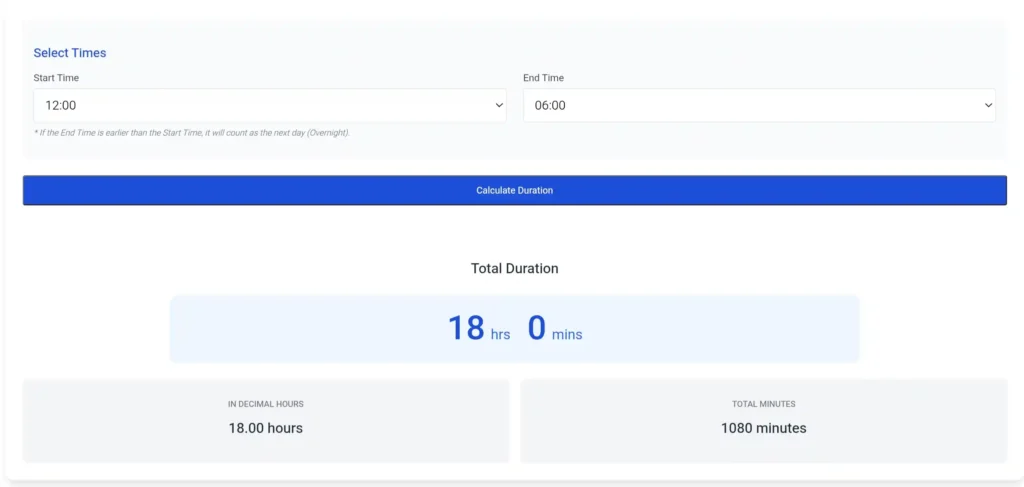
Real-Life Example
Scenario: You are a graphic designer working on a project. You started working at 10:45 AM and finished working at 3:20 PM. You charge $50 per hour and need to know exactly how much to invoice.
The Details:
- Start Time: 10:45 AM
- End Time: 03:20 PM
The Calculation:
Step 1: Convert to 24-Hour Format
- Start: 10:45
- End: 15:20 (Since 3 PM is 12 + 3 = 15).
Step 2: Convert to Total Minutes
- Start Minutes: (10 x 60) + 45 = 600 + 45 = 645 minutes.
- End Minutes: (15 x 60) + 20 = 900 + 20 = 920 minutes.
Step 3: Calculate the Difference
920 (End) – 645 (Start) = 275 Total Minutes.
Step 4: Convert Back to Hours and Minutes
- Hours: 275 / 60 = 4.5833… (4 whole hours).
- Remaining Minutes: 0.5833 x 60 = 35 minutes.
- Or simply: 275 – (4 x 60) = 35.
The Result:
- Time Duration: 4 Hours and 35 Minutes.
- Decimal Hours: 4 + (35/60) = 4.58 Hours.
Financial Application:
To calculate the bill, multiply the decimal hours by the wage.
4.58 hours x 50=50=229.00.
Frequently Asked Questions (FAQ)
How do I calculate a time difference that goes overnight?
The calculator handles this automatically. If you enter Start: 10:00 PM and End: 2:00 AM, the tool recognizes that the End Time belongs to the next day. It adds 24 hours to the calculation to give you the correct duration of 4 hours.
Why is “4 Hours 30 Minutes” equal to “4.5 Hours”?
This is a common confusion between time formats and decimal formats. An hour has 60 minutes. Therefore, 30 minutes is exactly half of an hour. In decimals, “half” is represented as 0.5. So, 4:30 becomes 4.5. Similarly, 15 minutes is a quarter of an hour, or 0.25.
Can I use this for payroll timesheets?
Yes, this is the most common use for this tool. However, ensure you convert the “Minutes” into “Decimals” before multiplying by an hourly rate. If you multiply your rate by the minutes (e.g., rate x 4.30 for 4 hours 30 mins), you will undercharge yourself. You must use the decimal format (rate x 4.5).
Does this calculator account for breaks (lunch)?
This standard duration calculator measures the total time between point A and point B. If you took an unpaid 30-minute lunch break in the middle, you should calculate the total duration first and then manually subtract 30 minutes from the final result.
What is the difference between military time and standard time?
Standard time uses a 12-hour cycle with AM and PM. Military time (or 24-hour time) runs from 00:00 to 23:59 to eliminate ambiguity. For example, 1:00 PM is 13:00. This calculator accepts standard inputs but processes them using military time logic for accuracy.
Can I calculate the duration between dates (e.g., Jan 1 to Jan 3)?
This specific tool is a “Time Duration calculator, focused on hours and minutes within a 24-hour cycle (or slightly over). For calculating the number of days between dates, you should use a “Date Duration Calculator” or “Days Between Dates” tool.